
Documentation Index
Fetch the complete documentation index at: https://modelcontextprotocol.io/llms.txt Use this file to discover all available pages before exploring further.
MCP Inspector
Interactive developer tooling for testing and debugging MCP servers, in the browser, on the command line, and in the terminal
The MCP Inspector is the reference developer tool for testing and debugging MCP servers. It ships as a single package, @modelcontextprotocol/inspector, providing three clients behind one binary:
| Client | Invocation | What it’s for |
|---|---|---|
| Web | npx @modelcontextprotocol/inspector | A full graphical inspector in the browser. The default, and the richest surface. |
| CLI | npx @modelcontextprotocol/inspector --cli | A scriptable, machine-readable client for CI, shell pipelines, and coding agents. |
| TUI | npx @modelcontextprotocol/inspector --tui | An interactive terminal UI, for when a browser isn’t available or wanted. |
All three are built on the same shared core, so a connection behaves identically across them: the same transports, the same configuration files, the same OAuth state on disk, and the same protocol-era negotiation (legacy vs. modern 2026-07-28).
The package also installs mcpdo, an experimental connection client that connects to a server once and keeps it open across many commands, on the same core.
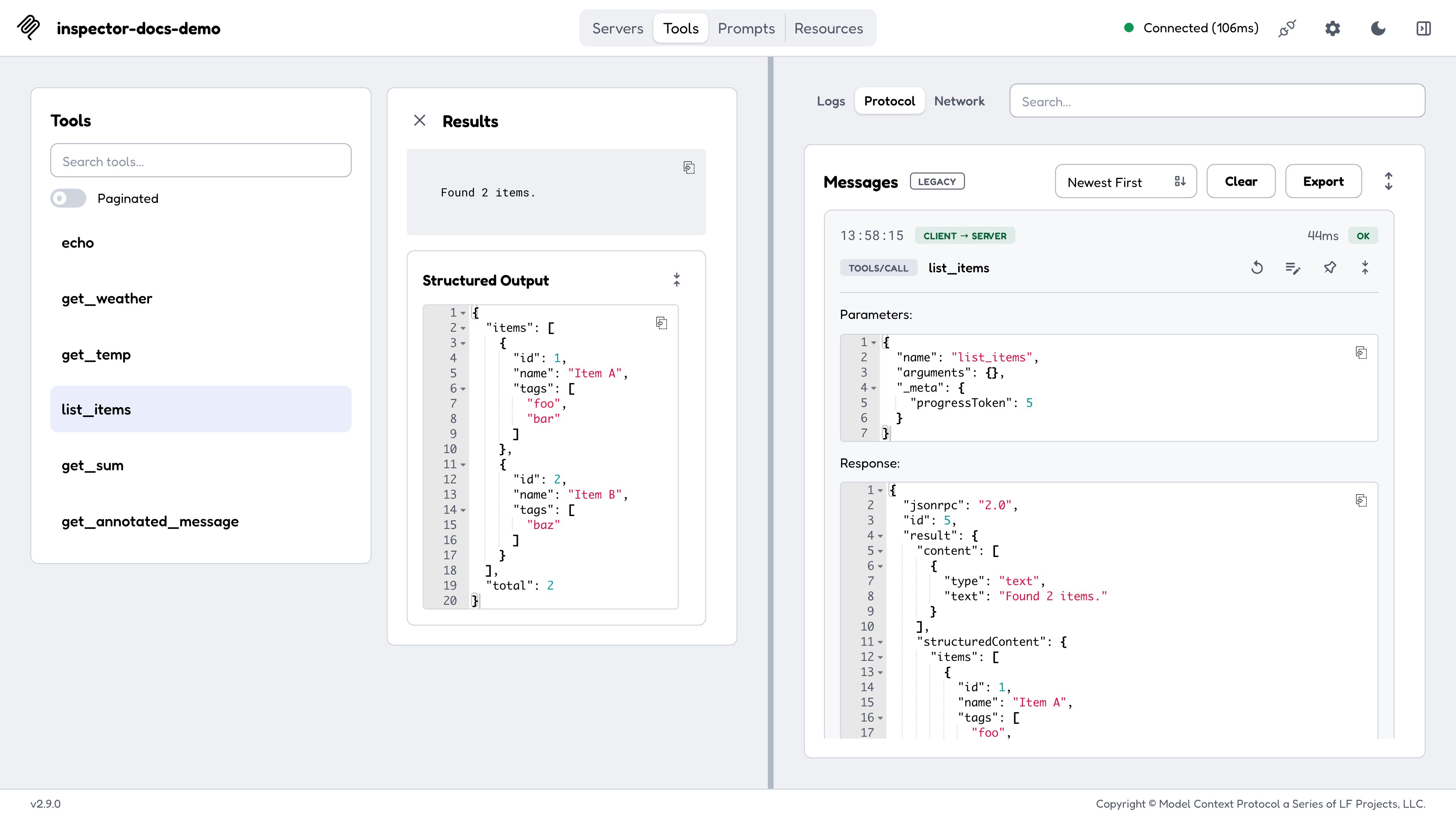
The MCP Inspector web client after a tool call, with the monitoring sidebar pinned and widened so the JSON-RPC exchange stays readable while you work.
Quickstart
The Inspector requires Node 22.19.0 or newer and runs directly through npx. No installation is required:
Web
# Launch the web UI and connect to a local stdio server
npx @modelcontextprotocol/inspector node path/to/server/index.js

# Or launch with no target and add servers from the UI
npx @modelcontextprotocol/inspector
The command prints a URL carrying a per-launch API token and opens it in your browser (set MCP_AUTO_OPEN_ENABLED=false to stop it opening). See Web client.
CLI
# List a server's tools and exit
npx @modelcontextprotocol/inspector --cli node path/to/server/index.js --method tools/list

# Call a tool and pipe the result into jq
npx @modelcontextprotocol/inspector --cli https://api.example.com/mcp --transport http \
  --method tools/call --tool-name get_weather --tool-arg city=Boston --format json | jq .result
See CLI client.
TUI
npx @modelcontextprotocol/inspector --tui node path/to/server/index.jsSee TUI client.
Inspecting published servers
Pass the command that launches the server as the Inspector’s arguments, or point it at a remote server with --server-url:
npm package
npx -y @modelcontextprotocol/inspector npx @modelcontextprotocol/server-filesystem ~/DesktopPyPI package
npx @modelcontextprotocol/inspector uvx mcp-server-git --repository ~/code/mcp/servers.gitRemote HTTP server
npx @modelcontextprotocol/inspector --server-url https://api.example.com/mcp --transport httpAlways read a server’s own README first, since every server requires different commands and arguments.
[!WARNING]
The Inspector stores secrets (OAuth tokens, OAuth client secrets, and stdio
env:values) in the OS keychain when one is available. On a machine with no keychain (Linux without libsecret or a Secret Service, headless and SSH sessions, Termux, and containers with a mounted volume) they are saved to~/.mcp-inspector/secrets.jsoninstead, unencrypted unless you supply a key. See Where secrets are stored for how to get a keychain back, encrypt the file, or keep secrets in memory only.
Launcher flags vs. client flags
mcp-inspector, the binary that npx @modelcontextprotocol/inspector runs, is a thin launcher. It owns only two things:
- The mode flag:
--web(default),--cli, or--tui. At most one; passing two errors withSpecify at most one of --web, --cli, or --tui. -h/--help.
Everything else (--catalog, --config, --server-url, --transport, --method, the OAuth flags) is defined by the client, not the launcher, and the clients do not all define the same set. The Configuration and flags page is organized that way, by owner.
[!NOTE]
Mode flags are recognized only at the front of the command line: the first token that isn’t
--web/--cli/--tuiends launcher parsing, and everything after it is forwarded to the client unchanged. That’s what lets a literal--cliappear later as one of your server’s own arguments:mcp-inspector --cli node server.js --cli # mode is CLI; the trailing --cli goes to server.js
[!NOTE]
--helpbehaves differently with and without a mode flag. Without one,-h/--helpanywhere on the command line (even after a server command) prints the launcher’s help and exits. With a mode flag it is forwarded, somcp-inspector --cli --helpprints the CLI’s full flag reference instead.
Where to go next
A tab-by-tab walkthrough of the graphical inspector.
Method reference, output formats, exit codes, and CI recipes.
Terminal navigation and keyboard reference.
Catalog vs. config files, the full per-client flag reference, and environment variables.
The OAuth flow end to end, mid-session re-authorization, and loopback callbacks.
Legacy vs. modern (2026-07-28) operation, and how every tab changes between protocol eras.
Connect once, then run many commands against a named connection.
The threat model: the web backend’s token, Docker, secret storage, stdio servers, and the mcpdo daemon.
Importing client configs, reviewing MCP Apps, Docker, and network hosting.
Broader debugging strategies beyond the Inspector.