Version: 2.0.0
On this page
A procedure is a function exported by a database, similar to a reducer. Connected clients can call procedures. Procedures can perform additional operations not possible in reducers, including making HTTP requests to external services. However, procedures don’t automatically run in database transactions, and must manually open and commit a transaction in order to read from or modify the database state. For this reason, prefer defining reducers rather than procedures unless you need to use one of the special procedure operators.
Defining Procedures
- TypeScript
- C#
- Rust
- C++
Define a procedure with spacetimedb.procedure:
export const add_two_numbers = spacetimedb.procedure(
    { lhs: t.u32(), rhs: t.u32() },
    t.u64(),
    (ctx, { lhs, rhs }) => BigInt(lhs) + BigInt(rhs),
);
The spacetimedb.procedure function takes:
- the procedure name,
- (optional) an object representing its parameter types,
- its return type,
- and the procedure function itself.
The function will receive a ProcedureContext and an object of its
arguments, and it must return a value corresponding to its return type.
This return value will be sent to the caller, but will not be broadcast
to any other clients.
Unstable Feature
Procedures in C# are currently unstable. To use them, add
#pragma warning disable STDB_UNSTABLE at the top of your file.
Define a procedure by annotating a static method with
[SpacetimeDB.Procedure].
The method’s first argument must be of type ProcedureContext. A
procedure may accept any number of additional arguments and may return a
value.
#pragma warning disable STDB_UNSTABLE

[SpacetimeDB.Procedure]
public static ulong AddTwoNumbers(ProcedureContext ctx, uint lhs, uint rhs)
{
    return (ulong)lhs + (ulong)rhs;
}
Because procedures are unstable, Rust modules that define them must opt
in to the unstable feature in their Cargo.toml:
[dependencies]
spacetimedb = { version = "2.*", features = ["unstable"] }
Define a procedure by annotating a function with
#[spacetimedb::procedure].
This function’s first argument must be of type
&mut spacetimedb::ProcedureContext. By convention, this argument is
named ctx.
A procedure may accept any number of additional arguments. Each argument
must be of a type that implements spacetimedb::SpacetimeType. When
defining a struct or enum, annotate it with
#[derive(spacetimedb::SpacetimeType)] to make it usable as a procedure
argument. These argument values will not be broadcast to clients other
than the caller.
A procedure may return a value of any type that implements
spacetimedb::SpacetimeType. This return value will be sent to the
caller, but will not be broadcast to any other clients.
#[spacetimedb::procedure]
fn add_two_numbers(ctx: &mut spacetimedb::ProcedureContext, lhs: u32, rhs: u32) -> u64 {
    lhs as u64 + rhs as u64
}
Unstable Feature
Procedures in C++ are currently unstable. To use them, add
#define SPACETIMEDB_UNSTABLE_FEATURES before including the SpacetimeDB
header.
Define a procedure using the SPACETIMEDB_PROCEDURE macro.
The macro’s first parameter is the return type, followed by the
procedure name. The function’s first argument must be of type
ProcedureContext. By convention, this argument is named ctx. A
procedure may accept any number of additional arguments and must return
a value.
#define SPACETIMEDB_UNSTABLE_FEATURES
#include <spacetimedb.h>
using namespace SpacetimeDB;

SPACETIMEDB_PROCEDURE(uint64_t, add_two_numbers, ProcedureContext ctx, uint32_t lhs, uint32_t rhs) {
    return static_cast<uint64_t>(lhs) + static_cast<uint64_t>(rhs);
}
Accessing the database
- TypeScript
- C#
- Rust
- C++
Unlike reducers, procedures don’t automatically run in database
transactions. This means there’s no ctx.db field to access the
database. Instead, procedure code must manage transactions explicitly
with ProcedureCtx.withTx.
const myTable = table(
    { name: "my_table" },
    {
        a: t.u32(),
        b: t.string(),
    },
)

const spacetimedb = schema({ myTable });
export default spacetimedb;

export const insertAValue = spacetimedb.procedure({ a: t.u32(), b: t.u32() }, t.unit(), (ctx, { a, b }) => {
    ctx.withTx(ctx => {
        ctx.db.myTable.insert({ a, b });
    });
    return {};
})
ProcedureCtx.withTx takes a function of (ctx: TransactionCtx) => T.
Within that function, the TransactionCtx can be used to access the
database in all the same ways as a
ReducerCtx When the
function returns, the transaction will be committed, and its changes to
the database state will become permanent and be broadcast to clients. If
the function throws an error, the transaction will be rolled back, and
its changes will be discarded.
warning
The function passed to ProcedureCtx.withTx may be invoked multiple
times, possibly seeing a different version of the database state each
time.
If invoked more than once with reference to the same database state, it must perform the same operations and return the same result each time.
If invoked more than once with reference to different database states, values observed during prior runs must not influence the behavior of the function or the calling procedure.
Avoid capturing mutable state within functions passed to withTx.
Unlike reducers, procedures don’t automatically run in database
transactions. This means there’s no ctx.Db field to access the
database. Instead, procedure code must manage transactions explicitly
with ProcedureContext.WithTx.
#pragma warning disable STDB_UNSTABLE
using SpacetimeDB;

public static partial class Module
{
    [SpacetimeDB.Table(Accessor = "MyTable")]
    public partial struct MyTable
    {
        public uint A;
        public string B;
    }

    [SpacetimeDB.Procedure]
    public static void InsertAValue(ProcedureContext ctx, uint a, string b)
    {
        ctx.WithTx(txCtx =>
        {
            txCtx.Db.MyTable.Insert(new MyTable { A = a, B = b });
            return 0;
        });
    }
}
ProcedureContext.WithTx takes a function of type
Func<ProcedureTxContext, T>. Within that function, the
TransactionContext can be used to access the database in all the same
ways as a ReducerContext.
When the function returns, the transaction will be committed, and its
changes to the database state will become permanent and be broadcast to
clients. If the function throws an exception, the transaction will be
rolled back, and its changes will be discarded.
warning
The function passed to ProcedureContext.WithTx may be invoked multiple
times, possibly seeing a different version of the database state each
time.
If invoked more than once with reference to the same database state, it must perform the same operations and return the same result each time.
If invoked more than once with reference to different database states, values observed during prior runs must not influence the behavior of the function or the calling procedure.
Avoid capturing mutable state within functions passed to WithTx.
Unlike reducers, procedures don’t automatically run in database
transactions. This means there’s no ctx.db field to access the
database. Instead, procedure code must manage transactions explicitly
with ProcedureContext::with_tx.
#[spacetimedb::table(accessor = my_table)]
struct MyTable {
    a: u32,
    b: String,
}

#[spacetimedb::procedure]
fn insert_a_value(ctx: &mut ProcedureContext, a: u32, b: String) {
    ctx.with_tx(|ctx| {
        ctx.my_table().insert(MyTable { a, b });
    });
}
ProcedureContext::with_tx takes a function of type
Fn(&TxContext) -> T. Within that function, the &TxContext can be
used to access the database in all the same ways as a
ReducerContext.
When the function returns, the transaction will be committed, and its
changes to the database state will become permanent and be broadcast to
clients. If the function panics, the transaction will be rolled back,
and its changes will be discarded. However, for transactions that may
fail, prefer calling try_with_tx and returning a
Result rather than panicking.
warning
The function passed to ProcedureContext::with_tx may be invoked
multiple times, possibly seeing a different version of the database
state each time.
If invoked more than once with reference to the same database state, it must perform the same operations and return the same result each time.
If invoked more than once with reference to different database states, values observed during prior runs must not influence the behavior of the function or the calling procedure.
Avoid capturing mutable state within functions passed to with_tx.
Unlike reducers, procedures don’t automatically run in database
transactions. This means there’s no ctx.db field to access the
database. Instead, procedure code must manage transactions explicitly
with ctx.with_tx.
#define SPACETIMEDB_UNSTABLE_FEATURES
#include <spacetimedb.h>
using namespace SpacetimeDB;

struct MyTable {
    uint32_t a;
    std::string b;
};
SPACETIMEDB_STRUCT(MyTable, a, b)
SPACETIMEDB_TABLE(MyTable, my_table, Public)

SPACETIMEDB_PROCEDURE(Unit, insert_a_value, ProcedureContext ctx, uint32_t a, std::string b) {
    ctx.with_tx([&](https://spacetimedb.com/docs/functions/TxContext&%20tx) {
        tx.db[my_table].insert(MyTable{a, b});
    });
    return Unit{};
}
ctx.with_tx takes a lambda function with signature
[](https://spacetimedb.com/docs/functions/TxContext&%20tx) -> T. Within that function, the TxContext can be
used to access the database in all the same ways as a
ReducerContext. When the
function returns, the transaction will be committed, and its changes to
the database state will become permanent and be broadcast to clients. If
the function throws an exception, the transaction will be rolled back,
and its changes will be discarded. However, for transactions that may
fail, prefer calling try_with_tx and returning
bool rather than throwing.
warning
The function passed to ctx.with_tx may be invoked multiple times,
possibly seeing a different version of the database state each time.
If invoked more than once with reference to the same database state, it must perform the same operations and return the same result each time.
If invoked more than once with reference to different database states, values observed during prior runs must not influence the behavior of the function or the calling procedure.
Avoid capturing mutable state within functions passed to with_tx.
Fallible database operations
- TypeScript
- C#
- Rust
- C++
For fallible database operations, you can throw an error inside the transaction function:
export const maybeInsertAValue = spacetimedb.procedure({ a: t.u32(), b: t.string() }, t.unit(), (ctx, { a, b }) => {
    ctx.withTx(ctx => {
        if (a < 10) {
            throw new SenderError("a is less than 10!");
        }
        ctx.db.myTable.insert({ a, b });
    });
})
For fallible database operations, you can throw an exception inside the transaction function:
#pragma warning disable STDB_UNSTABLE
using SpacetimeDB;

public static partial class Module
{
    [SpacetimeDB.Procedure]
    public static void MaybeInsertAValue(ProcedureContext ctx, uint a, string b)
    {
        ctx.WithTx(txCtx =>
        {
            if (a < 10)
            {
                throw new Exception("a is less than 10!");
            }
            txCtx.Db.MyTable.Insert(new MyTable { A = a, B = b });
            return 0;
        });
    }
}
For fallible database operations, instead use
ProcedureContext::try_with_tx:
#[spacetimedb::procedure]
fn maybe_insert_a_value(ctx: &mut ProcedureContext, a: u32, b: String) {
    ctx.try_with_tx(|ctx| {
        if a < 10 {
            return Err("a is less than 10!");
        }
        ctx.my_table().insert(MyTable { a, b });
        Ok(())
    });
}
ProcedureContext::try_with_tx takes a function of type
Fn(&TxContext) -> Result<T, E>. If the function returns Ok, the
transaction will be committed, and its changes to the database state
will become permanent and be broadcast to clients. If that function
returns Err, the transaction will be rolled back, and its changes will
be discarded.
For fallible database operations, use ctx.try_with_tx with a lambda
that returns bool:
#define SPACETIMEDB_UNSTABLE_FEATURES
#include <spacetimedb.h>
using namespace SpacetimeDB;

SPACETIMEDB_PROCEDURE(bool, maybe_insert_a_value, ProcedureContext ctx, uint32_t a, std::string b) {
    return ctx.try_with_tx([&](https://spacetimedb.com/docs/functions/TxContext&%20tx) -> bool {
        if (a < 10) {
            return false;  // Rollback transaction
        }
        tx.db[my_table].insert(MyTable{a, b});
        return true;  // Commit transaction
    });
}
ctx.try_with_tx takes a lambda function with signature
[](https://spacetimedb.com/docs/functions/TxContext&%20tx) -> bool. If the function returns true, the
transaction will be committed, and its changes to the database state
will become permanent and be broadcast to clients. If the function
returns false, the transaction will be rolled back, and its changes
will be discarded.
note
For non-bool return types, try_with_tx always commits the transaction.
To abort in those cases, use LOG_PANIC.
Reading values out of the database
- TypeScript
- C#
- Rust
- C++
Functions passed to ProcedureCtx.withTx may
return a value, and that value will be returned to the calling
procedure.
Transaction return values are never saved or broadcast to clients, and are used only by the calling procedure.
const player = table(
    { name: "player" },
    {
        id: t.identity(),
        level: t.u32(),
    },
);

const spacetimedb = schema({ player });
export default spacetimedb;

export const find_highest_level_player = spacetimedb.procedure(t.unit(), ctx => {
    let highestLevelPlayer = ctx.withTx(ctx =>
        Iterator.from(ctx.db.player).reduce(
            (a, b) => a == null || b.level > a.level ? b : a,
            null
        )
    );
    if (highestLevelPlayer != null) {
        console.log("Congratulations to ", highestLevelPlayer.id);
    } else {
        console.warn("No players...");
    }
    return {};
});
Functions passed to ProcedureContext.WithTx
may return a value, and that value will be returned to the calling
procedure.
Transaction return values are never saved or broadcast to clients, and are used only by the calling procedure.
#pragma warning disable STDB_UNSTABLE
using SpacetimeDB;

public static partial class Module
{
    [SpacetimeDB.Table(Accessor = "Player")]
    public partial struct Player
    {
        public Identity Id;
        public uint Level;
    }

    [SpacetimeDB.Procedure]
    public static void FindHighestLevelPlayer(ProcedureContext ctx)
    {
        var highestLevelPlayer = ctx.WithTx(txCtx =>
        {
            Player? highest = null;
            foreach (var player in txCtx.Db.Player.Iter())
            {
                if (highest == null || player.Level > highest.Value.Level)
                {
                    highest = player;
                }
            }
            return highest;
        });

        if (highestLevelPlayer.HasValue)
        {
            Log.Info($"Congratulations to {highestLevelPlayer.Value.Id}");
        }
        else
        {
            Log.Warn("No players...");
        }
    }
}
Functions passed to
ProcedureContext::with_tx and
ProcedureContext::try_with_tx may
return a value, and that value will be returned to the calling
procedure.
Transaction return values are never saved or broadcast to clients, and are used only by the calling procedure.
#[spacetimedb::table(accessor = player)]
struct Player {
    id: spacetimedb::Identity,
    level: u32,
}

#[spacetimedb::procedure]
fn find_highest_level_player(ctx: &mut ProcedureContext) {
    let highest_level_player = ctx.with_tx(|ctx| {
        ctx.db.player().iter().max_by_key(|player| player.level)
    });
    match highest_level_player {
        Some(player) => log::info!("Congratulations to {}", player.id),
        None => log::warn!("No players..."),
    }
}
Functions passed to ctx.with_tx and
ctx.try_with_tx may return a value,
and that value will be returned to the calling procedure.
Transaction return values are never saved or broadcast to clients, and are used only by the calling procedure.
#define SPACETIMEDB_UNSTABLE_FEATURES
#include <spacetimedb.h>
using namespace SpacetimeDB;

struct Player {
    Identity id;
    uint32_t level;
};
SPACETIMEDB_STRUCT(Player, id, level)
SPACETIMEDB_TABLE(Player, player, Public)

SPACETIMEDB_PROCEDURE(Unit, find_highest_level_player, ProcedureContext ctx) {
    auto highest_level_player = ctx.with_tx([](https://spacetimedb.com/docs/functions/TxContext&%20tx) -> std::optional<Player> {
        std::optional<Player> highest;
        for (const auto& player : tx.db[player]) {
            if (!highest || player.level > highest->level) {
                highest = player;
            }
        }
        return highest;
    });

    if (highest_level_player) {
        LOG_INFO("Congratulations to " + highest_level_player->id.to_hex_string());
    } else {
        LOG_WARN("No players...");
    }
    return Unit{};
}
HTTP Requests
- TypeScript
- C#
- Rust
- C++
Procedures can make HTTP requests to external services using methods
contained in ctx.http.
ctx.http.fetch is similar to the browser fetch() API, but is
synchronous.
It can perform simple GET requests:
export const get_request = spacetimedb.procedure(t.unit(), ctx => {
    try {
        const response = ctx.http.fetch("https://example.invalid");
        const body = response.text();
        console.log(`Got response with status ${response.status} and body ${body}`);
    } catch (e) {
        console.error("Request failed: ", e);
    }
    return {};
});
It can also accept an options object to specify a body, headers, HTTP method, and timeout:
export const post_request = spacetimedb.procedure(t.unit(), ctx => {
    try {
        const response = ctx.http.fetch("https://example.invalid/upload", {
            method: "POST",
            headers: { "Content-Type": "text/plain" },
            body: "This is the body of the HTTP request",
        });
        const body = response.text();
        console.log(`Got response with status ${response.status} and body {body}`);
    } catch (e) {
        console.error("Request failed: ", e);
    }
    return {};
});

export const get_request_with_short_timeout = spacetimedb.procedure(t.unit(), ctx => {
    try {
        const response = ctx.http.fetch("https://example.invalid", {
            method: "GET",
            timeout: TimeDuration.fromMillis(10),
        });
        const body = response.text();
        console.log(`Got response with status ${response.status} and body {body}`);
    } catch (e) {
        console.error("Request failed: ", e);
    }
    return {};
});
Procedures can’t send requests at the same time as holding open a transaction.
Procedures can make HTTP requests to external services using methods on
ctx.Http.
ctx.Http.Get performs simple GET requests with no headers:
#pragma warning disable STDB_UNSTABLE
using SpacetimeDB;

public static partial class Module
{
    [SpacetimeDB.Procedure]
    public static void GetRequest(ProcedureContext ctx)
    {
        var result = ctx.Http.Get("https://example.invalid");
        switch (result)
        {
            case Result<HttpResponse, HttpError>.OkR(var response):
                var body = response.Body.ToStringUtf8Lossy();
                Log.Info($"Got response with status {response.StatusCode} and body {body}");
                break;
            case Result<HttpResponse, HttpError>.ErrR(var e):
                Log.Error($"Request failed: {e.Message}");
                break;
        }
    }
}
ctx.Http.Send sends an HttpRequest with custom method, headers, and
body:
#pragma warning disable STDB_UNSTABLE
using SpacetimeDB;

public static partial class Module
{
    [SpacetimeDB.Procedure]
    public static void PostRequest(ProcedureContext ctx)
    {
        var request = new HttpRequest
        {
            Method = SpacetimeDB.HttpMethod.Post,
            Uri = "https://example.invalid/upload",
            Headers = new List<HttpHeader>
            {
                new HttpHeader("Content-Type", "text/plain")
            },
            Body = HttpBody.FromString("This is the body of the HTTP request")
        };
        var result = ctx.Http.Send(request);
        switch (result)
        {
            case Result<HttpResponse, HttpError>.OkR(var response):
                var body = response.Body.ToStringUtf8Lossy();
                Log.Info($"Got response with status {response.StatusCode} and body {body}");
                break;
            case Result<HttpResponse, HttpError>.ErrR(var e):
                Log.Error($"Request failed: {e.Message}");
                break;
        }
    }
}
Procedures can’t send requests at the same time as holding open a transaction.
Procedures can make HTTP requests to external services using methods
contained in ctx.http.
ctx.http.get performs simple GET requests with no headers:
#[spacetimedb::procedure]
fn get_request(ctx: &mut ProcedureContext) {
    match ctx.http.get("https://example.invalid") {
        Ok(response) => {
            let (response, body) = response.into_parts();
            log::info!(
                "Got response with status {} and body {}",
                response.status,
                body.into_string_lossy(),
            )
        },
        Err(error) => log::error!("Request failed: {error:?}"),
    }
}
ctx.http.send sends any
http::Request
whose body can be converted to spacetimedb::http::Body.
http::Request is re-exported as spacetimedb::http::Request.
#[spacetimedb::procedure]
fn post_request(ctx: &mut spacetimedb::ProcedureContext) {
    let request = spacetimedb::http::Request::builder()
        .uri("https://example.invalid/upload")
        .method("POST")
        .header("Content-Type", "text/plain")
        .body("This is the body of the HTTP request")
        .expect("Building `Request` object failed");
    match ctx.http.send(request) {
        Ok(response) => {
            let (response, body) = response.into_parts();
            log::info!(
                "Got response with status {} and body {}",
                response.status,
                body.into_string_lossy(),
            )
        }
        Err(error) => log::error!("Request failed: {error:?}"),
    }
}
Each of these methods returns a
http::Response
containing a spacetimedb::http::Body. http::Response is re-exported
as spacetimedb::http::Response.
Set a timeout for a ctx.http.send request by including a
spacetimedb::http::Timeout as an
extension:
#[spacetimedb::procedure]
fn get_request_with_short_timeout(ctx: &mut spacetimedb::ProcedureContext) {
    let request = spacetimedb::http::Request::builder()
        .uri("https://example.invalid")
        .method("GET")
        // Set a timeout of 10 ms.
        .extension(spacetimedb::http::Timeout(std::time::Duration::from_millis(10).into()))
        // Empty body for a `GET` request.
        .body(())
        .expect("Building `Request` object failed");
    ctx.http.send(request).expect("HTTP request failed");
}
Procedures can’t send requests at the same time as holding open a transaction.
Unstable Feature
HTTP requests in C++ procedures are currently unstable. To use them, add
#define SPACETIMEDB_UNSTABLE_FEATURES before including the SpacetimeDB
header.
Procedures can make HTTP requests to external services using methods on
ctx.http.
ctx.http.get performs simple GET requests:
#define SPACETIMEDB_UNSTABLE_FEATURES
#include <spacetimedb.h>
using namespace SpacetimeDB;

SPACETIMEDB_PROCEDURE(Unit, get_request, ProcedureContext ctx) {
    auto result = ctx.http.get("https://example.invalid");

    if (result.is_ok()) {
        auto& response = result.value();
        auto body = response.body.to_string_utf8_lossy();
        LOG_INFO("Got response with status " + std::to_string(response.status_code) +
                 " and body " + body);
    } else {
        LOG_ERROR("Request failed: " + result.error());
    }

    return Unit{};
}
ctx.http.send sends an HttpRequest with custom method, headers, and
body:
#define SPACETIMEDB_UNSTABLE_FEATURES
#include <spacetimedb.h>
using namespace SpacetimeDB;

SPACETIMEDB_PROCEDURE(Unit, post_request, ProcedureContext ctx) {
    HttpRequest request{
        .uri = "https://example.invalid/upload",
        .method = HttpMethod::post(),
        .headers = {HttpHeader{"Content-Type", "text/plain"}},
        .body = HttpBody::from_string("This is the body of the HTTP request")
    };

    auto result = ctx.http.send(request);

    if (result.is_ok()) {
        auto& response = result.value();
        auto body = response.body.to_string_utf8_lossy();
        LOG_INFO("Got response with status " + std::to_string(response.status_code) +
                 " and body " + body);
    } else {
        LOG_ERROR("Request failed: " + result.error());
    }

    return Unit{};
}
Set a timeout for a request using TimeDuration::from_millis():
#define SPACETIMEDB_UNSTABLE_FEATURES
#include <spacetimedb.h>
using namespace SpacetimeDB;

SPACETIMEDB_PROCEDURE(Unit, get_request_with_short_timeout, ProcedureContext ctx) {
    HttpRequest request{
        .uri = "https://example.invalid",
        .method = HttpMethod::get(),
        .timeout = TimeDuration::from_millis(10)
    };

    auto result = ctx.http.send(request);

    if (result.is_ok()) {
        auto& response = result.value();
        auto body = response.body.to_string_utf8_lossy();
        LOG_INFO("Got response with status " + std::to_string(response.status_code) +
                 " and body " + body);
    } else {
        LOG_ERROR("Request failed: " + result.error());
    }

    return Unit{};
}
Procedures can’t send requests at the same time as holding open a transaction.
note
If no timeout is specified, HTTP requests default to 30 seconds. User-specified timeouts are clamped to a maximum of 180 seconds by the host.
Calling Reducers from Procedures
Procedures can call reducers by invoking them within a transaction block. The reducer function runs within the transaction context:
- TypeScript
- C#
- Rust
- C++
// Define a reducer and save the reference
export const processItem = spacetimedb.reducer({ itemId: t.u64() }, (ctx, { itemId }) => {
  // ... reducer logic
});

// Call it from a procedure using the saved reference
export const fetch_and_process = spacetimedb.procedure({ url: t.string() }, t.unit(), (ctx, { url }) => {
  // Fetch external data
  const response = ctx.http.fetch(url);
  const data = response.json();

  // Call the reducer within a transaction
  ctx.withTx(txCtx => {
    processItem(txCtx, { itemId: data.id });
  });

  return {};
});
#pragma warning disable STDB_UNSTABLE
using SpacetimeDB;
public static partial class Module
{
// Note: In C#, you can define helper methods that work with the transaction context
// rather than calling reducers directly.
private static void ProcessItemLogic(ulong itemId)
{
// ... item processing logic
}
[SpacetimeDB.Procedure]
public static void FetchAndProcess(ProcedureContext ctx, string url)
{
// Fetch external data
var result = ctx.Http.Get(url);
var response = result.UnwrapOrThrow();
var body = response.Body.ToStringUtf8Lossy();
var itemId = ParseId(body);
// Process within a transaction
ctx.WithTx(txCtx =>
{
ProcessItemLogic(itemId);
return 0;
});
}
private static ulong ParseId(string body)
{
// Parse the ID from the response body
return ulong.Parse(body);
}
}#[spacetimedb::reducer]
fn process_item(ctx: &ReducerContext, item_id: u64) {
// ... reducer logic
}
#[spacetimedb::procedure]
fn fetch_and_process(ctx: &mut ProcedureContext, url: String) -> Result<(), String> {
// Fetch external data
let response = ctx.http.get(&url).map_err(|e| format!("{e:?}"))?;
let (_, body) = response.into_parts();
let item_id: u64 = parse_id(&body.into_string_lossy());
// Call the reducer within a transaction
ctx.with_tx(|tx_ctx| {
process_item(tx_ctx, item_id);
});
Ok(())
}Unstable Feature
Procedures in C++ are currently unstable. To use them, add
#define SPACETIMEDB_UNSTABLE_FEATURES before including the SpacetimeDB
header.
In C++, TxContext and ReducerContext share the same database API, so
it’s common to move shared logic into a helper that takes a
DatabaseContext& and call it from both the reducer and the procedure.
#define SPACETIMEDB_UNSTABLE_FEATURES
#include <spacetimedb.h>
using namespace SpacetimeDB;

struct ProcessedItem {
    uint64_t id;
};
SPACETIMEDB_STRUCT(ProcessedItem, id)
SPACETIMEDB_TABLE(ProcessedItem, processed_item_proc, Public)
FIELD_PrimaryKey(processed_item_proc, id)

static void process_item_logic(DatabaseContext& db, uint64_t item_id) {
    db[processed_item_proc].insert(ProcessedItem{item_id});
}

SPACETIMEDB_REDUCER(process_item, ReducerContext& ctx, uint64_t item_id) {
    process_item_logic(ctx.db, item_id);
    return Ok();
}

SPACETIMEDB_PROCEDURE(Unit, fetch_and_process, ProcedureContext ctx, std::string url) {
    auto result = ctx.http.get(url);
    if (!result.is_ok()) {
        LOG_ERROR("Request failed: " + result.error());
        return Unit{};
    }

    auto& response = result.value();
    if (response.status_code != 200) {
        LOG_ERROR("HTTP status: " + std::to_string(response.status_code));
        return Unit{};
    }

    auto body = response.body.to_string_utf8_lossy();
    uint64_t item_id = std::stoull(body);

    ctx.with_tx([&](https://spacetimedb.com/docs/functions/TxContext&%20tx) {
        process_item_logic(tx.db, item_id);
    });

    return Unit{};
}
note
When you call a reducer function inside withTx, it executes as part of
the same transaction, not as a subtransaction. The reducer’s logic runs
inline within your anonymous transaction block, just like calling any
other helper function.
This pattern is useful when you need to:
- Fetch external data and then process it transactionally
- Reuse existing reducer logic from a procedure
- Combine side effects (HTTP) with database operations
Calling procedures
- TypeScript
- C#
- Rust
- Unreal C++
- Unreal Blueprint
Clients can invoke procedures using methods on ctx.procedures:
ctx.procedures.insertAValue({ a: 12, b: "Foo" });Clients can invoke procedures using methods on ctx.Procedures:
ctx.Procedures.InsertAValue(12, "Foo");Clients can invoke procedures using methods on ctx.procedures:
ctx.procedures.insert_a_value(12, "Foo".to_string());Clients can invoke procedures using methods on ctx.Procedures:
Context.Procedures->InsertAValue(12, TEXT("Foo"), {});Clients can invoke procedures using methods on ctx.Procedures:
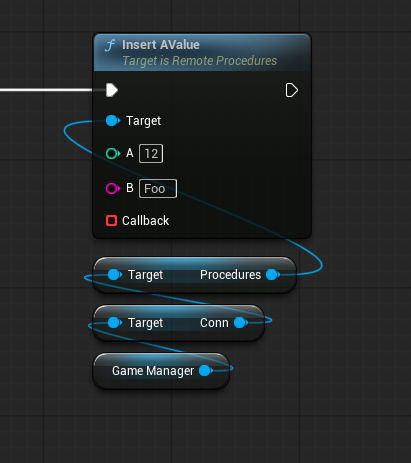
Observing return values
- TypeScript
- C#
- Rust
- Unreal C++
- Unreal Blueprint
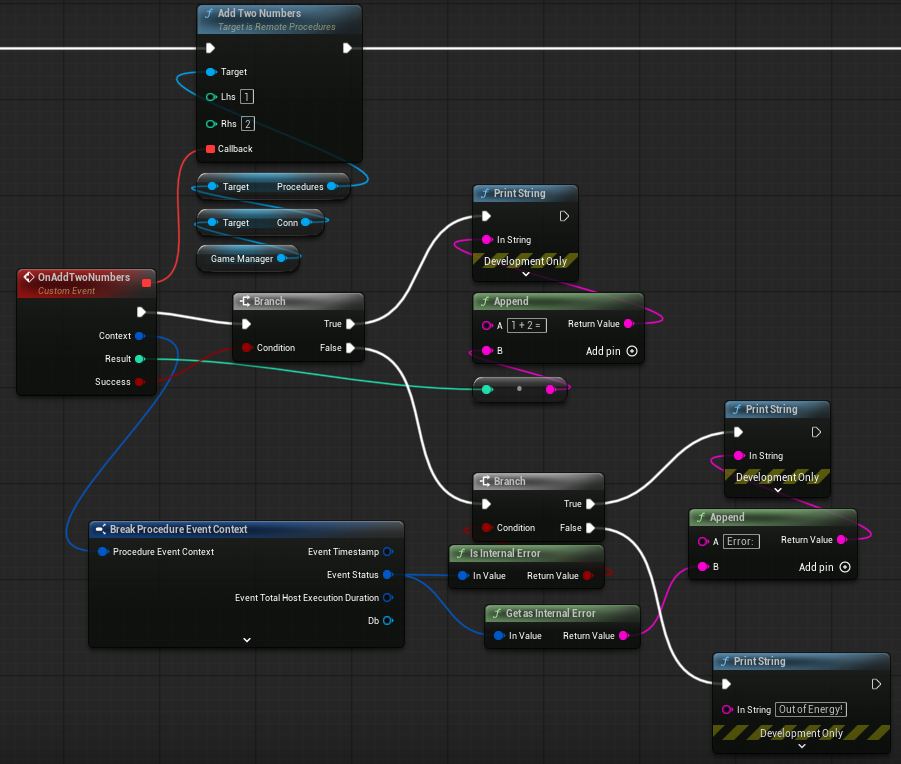
When a client invokes a procedure, it gets a
Promise
which resolves to the return value of the procedure.
ctx.procedures.addTwoNumbers({ lhs: 1, rhs: 2 }).then(
    sum => console.log(`1 + 2 = ${sum}`)
);
A client can also invoke a procedure while registering a callback to run when it completes. That callback will have access to the return value of the procedure, or an error if the procedure fails.
ctx.Procedures.AddTwoNumbers(1, 2, (ctx, result) =>
{
    if (result.IsSuccess)
    {
        Log.Info($"1 + 2 = {result.Value!}");
    }
    else
    {
        throw result.Error!;
    }
});
A client can also invoke a procedure while registering a callback to run when it completes. That callback will have access to the return value of the procedure, or an error if the procedure fails.
ctx.procedures.add_two_numbers_then(1, 2, |ctx, result| {
    let sum = result.expect("Procedure failed");
    println!("1 + 2 = {sum}");
});
A client can also invoke a procedure while registering a callback to run when it completes. That callback will have access to the return value of the procedure, or an error if the procedure fails.
{
    ...
    FOnAddTwoNumbersComplete ReturnCallback;
    BIND_DELEGATE_SAFE(ReturnCallback, this, AGameManager, OnAddTwoNumbersComplete);
    Context.Procedures->AddTwoNumbers(1, 2, ReturnCallback);
}

void AGameManager::OnAddTwoNumbersComplete(const FProcedureEventContext& Context, int32 Result, bool bSuccess)
{
    if (bSuccess)
    {
        UE_LOG(LogTemp, Log, TEXT("1 + 2 = %d"), Result);
    }
    else
    {
        if (Context.Event.Status.IsInternalError())
        {
            UE_LOG(LogTemp, Error, TEXT("Error: %s"), *Context.Event.Status.GetAsInternalError());
            return;
        }
        UE_LOG(LogTemp, Error, TEXT("Out of energy!"));
    }
}
A client can also invoke a procedure while registering a callback to run when it completes. That callback will have access to the return value of the procedure, or an error if the procedure fails.
Example: Calling an External AI API
A common use case for procedures is integrating with external APIs like OpenAI’s ChatGPT. Here’s a complete example showing how to build an AI-powered chat feature.
- TypeScript
- C#
- Rust
import { schema, t, table, SenderError } from 'spacetimedb/server';
import { TimeDuration } from 'spacetimedb';

const aiMessage = table(
  { name: 'ai_message', public: true },
  {
    user: t.identity(),
    prompt: t.string(),
    response: t.string(),
    createdAt: t.timestamp(),
  }
);

const spacetimedb = schema({ aiMessage });
export default spacetimedb;

export const askAi = spacetimedb.procedure(
  { prompt: t.string(), apiKey: t.string() },
  t.string(),
  (ctx, { prompt, apiKey }) => {
    // Make the HTTP request to OpenAI
    const response = ctx.http.fetch('https://api.openai.com/v1/chat/completions', {
      method: 'POST',
      headers: {
        'Content-Type': 'application/json',
        'Authorization': `Bearer ${apiKey}`,
      },
      body: JSON.stringify({
        model: 'gpt-4',
        messages: [{ role: 'user', content: prompt }],
      }),
      // Give it some time to think
      timeout: TimeDuration.fromMillis(3000),
    });

    if (response.status !== 200) {
      throw new SenderError(`API returned status ${response.status}`);
    }

    const data = response.json();
    const aiResponse = data.choices?.[0]?.message?.content;

    if (!aiResponse) {
      throw new SenderError('Failed to parse AI response');
    }

    // Store the conversation in the database
    ctx.withTx(txCtx => {
      txCtx.db.aiMessage.insert({
        user: txCtx.sender,
        prompt,
        response: aiResponse,
        createdAt: txCtx.timestamp,
      });
    });

    return aiResponse;
  }
);
#pragma warning disable STDB_UNSTABLE
using SpacetimeDB;
using System.Text.Json;
public static partial class Module
{
[SpacetimeDB.Table(Accessor = "AiMessage", Public = true)]
public partial struct AiMessage
{
public Identity User;
public string Prompt;
public string Response;
public Timestamp CreatedAt;
}
[SpacetimeDB.Procedure]
public static string AskAi(ProcedureContext ctx, string prompt, string apiKey)
{
// Build the request to OpenAI's API
var requestBody = JsonSerializer.Serialize(new
{
model = "gpt-4",
messages = new[] { new { role = "user", content = prompt } }
});
var request = new HttpRequest
{
Method = SpacetimeDB.HttpMethod.Post,
Uri = "https://api.openai.com/v1/chat/completions",
Headers = new List<HttpHeader>
{
new HttpHeader("Content-Type", "application/json"),
new HttpHeader("Authorization", $"Bearer {apiKey}")
},
Body = HttpBody.FromString(requestBody),
// Give it some time to think
Timeout = TimeSpan.FromMilliseconds(3000)
};
// Make the HTTP request
var response = ctx.Http.Send(request).UnwrapOrThrow();
if (response.StatusCode != 200)
{
throw new Exception($"API returned status {response.StatusCode}");
}
var bodyStr = response.Body.ToStringUtf8Lossy();
// Parse the response
var aiResponse = ExtractContent(bodyStr)
?? throw new Exception("Failed to parse AI response");
// Store the conversation in the database
ctx.WithTx(txCtx =>
{
txCtx.Db.AiMessage.Insert(new AiMessage
{
User = txCtx.Sender,
Prompt = prompt,
Response = aiResponse,
CreatedAt = txCtx.Timestamp
});
return 0;
});
return aiResponse;
}
private static string? ExtractContent(string json)
{
// Simple extraction - in production, use proper JSON parsing
var doc = JsonDocument.Parse(json);
return doc.RootElement
.GetProperty("choices")[0]
.GetProperty("message")
.GetProperty("content")
.GetString();
}
}use spacetimedb::{procedure, table, Identity, ProcedureContext, Table, TimeDuration, Timestamp};
#[table(accessor = ai_message, public)]
pub struct AiMessage {
user: Identity,
prompt: String,
response: String,
created_at: Timestamp,
}
#[derive(serde::Deserialize)]
struct AiResponse {
choices: Vec<AiResponseChoice>,
// more fields...
}
#[derive(serde::Deserialize)]
struct AiResponseChoice {
message: AiResponseMessage,
// more fields...
}
#[derive(serde::Deserialize)]
struct AiResponseMessage {
content: String,
// more fields...
}
#[procedure]
pub fn ask_ai(ctx: &mut ProcedureContext, prompt: String, api_key: String) -> Result<String, String> {
// Build the request to OpenAI's API
let request_body = serde_json::json!({
"model": "gpt-4",
"messages": [{ "role": "user", "content": prompt }]
});
let request = spacetimedb::http::Request::builder()
.uri("https://api.openai.com/v1/chat/completions")
.method("POST")
.header("Content-Type", "application/json")
.header("Authorization", format!("Bearer {}", api_key))
// Give it some time to think
.extension(spacetimedb::http::Timeout(TimeDuration::from_micros(3_000_000)))
.body(serde_json::to_vec(&request_body).unwrap())
.map_err(|e| format!("Failed to build request: {e}"))?;
// Make the HTTP request
let response = ctx.http.send(request)
.map_err(|e| format!("HTTP request failed: {e:?}"))?;
let (parts, body) = response.into_parts();
if parts.status != 200 {
return Err(format!("API returned status {}", parts.status));
}
let body = body.into_bytes();
let ai_response: AiResponse =
serde_json::from_slice(&body).map_err(|e| format!("Failed to parse AI response: {e}"))?;
let ai_response = ai_response.choices[0].message.content.clone();
// Store the conversation in the database
ctx.with_tx(|tx_ctx| {
tx_ctx.db.ai_message().insert(AiMessage {
user: tx_ctx.sender(),
prompt: prompt.clone(),
response: ai_response.clone(),
created_at: tx_ctx.timestamp,
});
});
Ok(ai_response)
}Calling from a client
- TypeScript
- C#
- Rust
// Call the procedure and wait for the AI response
const response = await ctx.procedures.askAi({
  prompt: "What is SpacetimeDB?",
  apiKey: process.env.OPENAI_API_KEY,
});

console.log("AI says:", response);
ctx.Procedures.AskAi("What is SpacetimeDB?", apiKey, (ctx, result) =>
{
if (result.IsSuccess)
{
Console.WriteLine($"AI says: {result.Value}");
}
else
{
Console.WriteLine($"Error: {result.Error}");
}
});ctx.procedures.ask_ai_then(
"What is SpacetimeDB?".to_string(),
api_key,
|_ctx, result| {
match result {
Ok(response) => println!("AI says: {}", response),
Err(e) => eprintln!("Error: {:?}", e),
}
},
);warning
Security note: Never hardcode API keys in your client code. Consider storing them securely on the server side or using environment variables during development.
Last updated Oct 08, 2026